




If you are setting up accounting software for your business, QuickBooks Online vs Desktop is probably the first decision you need to make. Both products come from Intuit, both handle the core accounting tasks you need such as invoicing, expense tracking, payroll, and reporting, but they work in very different ways. Choosing the wrong one can cost you time and money later on.
Here is a detailed breakdown of how they compare so you can make the right call for your specific situation.
What Is the Core Difference Between QuickBooks Online and Desktop?
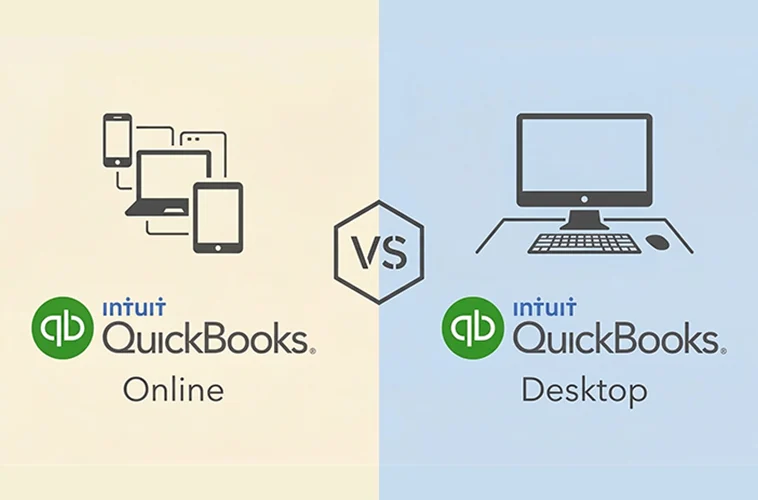
QuickBooks Online is cloud-based accounting software that runs in a web browser. You pay a monthly subscription, and you can access your books from any device (laptop, phone, tablet) as long as you have internet access. QuickBooks Desktop is traditional software you install on a specific computer. It works without the internet, stores your data locally, and is purchased as an annual subscription or a one-time license.
That single difference cloud vs. locally installed drives almost every other comparison between the two.
QuickBooks Online vs Desktop: Quick Comparision
| Feature | QuickBooks Online | QuickBooks Desktop |
|---|---|---|
| Access | Any device, anywhere | Specific computer only |
| Pricing Model | $30–$200/month | ~$549+/year (Desktop Pro+) |
| Automatic Updates | Yes | Manual updates required |
| Multi-user | Up to 25 users (Advanced) | Up to 40 users (Enterprise) |
| Offline Access | No | Yes |
| Integrations | 750+ third-party apps | 240+ apps |
| Reporting | 80+ reports | 130+ reports (Pro) |
| Industry Editions | No | Yes (Enterprise/Premier) |
| Mobile App | Yes | Limited |
| Data Storage | Cloud (Intuit servers) | Local machine |
| Bookkeeping Support | Yes (Live Bookkeeping) | No |
How Do Their Pricing Models Compare?
QuickBooks Online pricing breaks down into four tiers for:
- Simple Start: $30/month (1 user)
- Essentials: $60/month (up to 3 users)
- Plus: $90/month (up to 5 users)
- Advanced: $200/month (up to 25 users)
QuickBooks Desktop pricing works like this:
- Pro Plus: $399.99–$699.99/year (1–3 users)
- Premier Plus: $599.99–$1,099.99/year
- Enterprise: Starting at $2,292.30/year
Important note: In 2024, Intuit discontinued sales of QuickBooks Desktop Pro and Premier to new users. Only QuickBooks Desktop Enterprise is available for new Desktop subscribers. Existing Pro and Premier customers can continue using what they already purchased, but new buyers are limited to Enterprise or QuickBooks Online.
For a small business with one or two users, QuickBooks Online usually costs less over time. For larger teams needing multiple user licenses, the math gets more complex and depends on how many seats you need.
Which Version Is Easier to Use?
QuickBooks Online has a cleaner, more modern interface built for users who are not professional accountants. The layout is intuitive, the dashboard shows your business health at a glance, and the mobile app lets you send invoices and check reports from your phone. The learning curve is relatively short for most small business owners.
QuickBooks Desktop has a steeper learning curve. Its interface was designed for traditional accounting workflows and looks like software built for an office environment which it was. That is not necessarily bad.
Accountants and bookkeepers who work in Desktop daily often prefer it precisely because of its depth and control. But for a first-time user, it takes longer to get comfortable.
How Does Each Version Handle Collaboration?
QuickBooks Online is built for team access. Multiple users can log in from different locations at the same time. Your accountant can access your books without you having to send a file. Role-based permissions let you control exactly what each user can see and do.
QuickBooks Desktop requires each user to either be on the same computer or connected to a shared server. Remote access is possible, but it usually requires third-party hosting services or extra technical setup. If your team works from different locations, this becomes a real limitation.
Which One Has Better Reporting Features?
QuickBooks Desktop wins on reporting. The Pro version alone offers over 130 built-in reports, and Enterprise and Premier add industry-specific reports for construction, manufacturing, retail, and other sectors. If your business makes decisions based on detailed financial data, Desktop has more depth out of the box.
QuickBooks Online offers over 80 reports depending on your plan. That covers the essentials well — profit and loss, balance sheet, cash flow, accounts receivable aging. For most small businesses, this is enough. But if you need advanced job costing, phase tracking, or customized industry reports, Desktop Enterprise handles that better.
What About Integrations and Third-Party Apps?
QuickBooks Online integrates with over 750 third-party applications, including Shopify, PayPal, Gusto, Stripe, and hundreds of industry-specific tools. If you rely on other software to run your business, Online connects to most of them natively.
QuickBooks Desktop supports around 240 integrations. The selection is smaller, and connecting to cloud-based tools often requires additional workarounds. For businesses that depend heavily on automation and app connectivity, this is a meaningful gap.
Get detailed information about Quickbooks Software.
Who Should Use QuickBooks Online?
QuickBooks Online is the right call if you:
- Run a small or medium-sized business with straightforward accounting needs
- Work remotely or manage a distributed team
- Want your accountant or bookkeeper to access your books without sending files back and forth
- Need to connect your accounting software to tools like Shopify, PayPal, or Stripe
- Prefer a subscription model over a large upfront cost
- Value automatic updates and cloud backups without manual maintenance
Who Should Use QuickBooks Desktop?
QuickBooks Desktop still makes sense if you:
- Work in construction, manufacturing, nonprofit, or another industry that needs specialized reporting tools
- Need advanced inventory tracking, serialized inventory, or barcode scanning
- Handle complex job costing or project-based accounting with multiple phases
- Prefer storing your financial data on your own machine rather than in the cloud
- Have unreliable internet access and need full offline capability
- Are an accountant or bookkeeper who manages large volumes of transactions and needs maximum reporting depth
QuickBooks Online vs Desktop: Which One Wins for Your Business?
For most small business owners, QuickBooks Online is the better starting point. It costs less for single users, requires no IT setup, works on any device, and connects to the tools you likely already use. The automatic updates and cloud backups alone save hours of maintenance each year.
QuickBooks Desktop Enterprise still has an edge in advanced reporting, industry-specific features, offline access, and complex inventory management. If your business is in construction, manufacturing, or wholesale, and you have a dedicated accountant managing the books, Desktop Enterprise is worth the investment.
If you are not sure which one you need, start with QuickBooks Online. Its plans are flexible, it is easier to get running, and you can always switch or escalate later.
Getting locked into a more complex system than your business actually needs is the more costly mistake.