

If you’ve ever used a weather app, logged into a website using Google, or ordered food online, you’ve already used an API. You just didn’t know it. Most beginners hear the term and assume it is something only developers need to understand. That is not true. An API (Application Programming Interface) is one of the most important building blocks of modern software, and understanding it takes about five minutes.
What Is an API, Exactly?
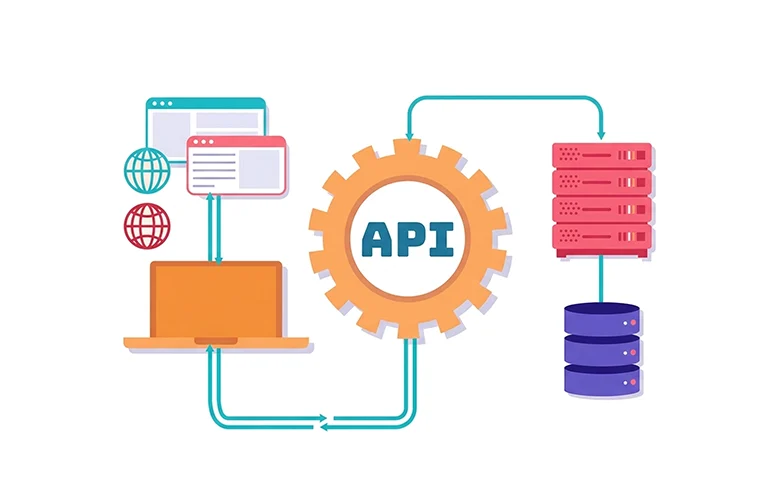
An API is a set of rules that lets two software applications talk to each other and share data. Think of it as a middleman sitting between two systems. One system asks for something, the API carries that request to the other system, gets the answer, and brings it back.
According to MuleSoft, there are over 15,000 publicly available APIs that developers can use to add features to their apps from maps and payments to weather data and social logins. That number grows every year.
How Does an API Work?
Every API works on a simple request-and-response cycle. Here’s what happens step by step:
- You trigger an action — You tap “Get Weather” in a weather app on your phone.
- The app sends a request — Your app sends a request to a weather service’s API endpoint (a specific URL the API listens to).
- The API processes it — The API forwards your request to the weather service’s server.
- The server responds — The server finds the weather data for your location and sends it back.
- You see the result — Your app displays “Sunny, 74°F” on your screen.
That entire process happens in milliseconds. You never see it. The API handles all the communication behind the scenes.
What Is an API Endpoint?
An API endpoint is a specific URL where an API receives requests. Every API has one or more endpoints depending on what data or actions it offers.
For example, a weather API might have one endpoint for current temperature, another for the weekly forecast, and another for historical data. When an app wants specific information, it calls the right endpoint for that data.
What Are Real-World Examples of APIs?
APIs are everywhere. Here are some you interact with every day without realizing it:
- Google Login — When a website lets you sign in with your Google account, it uses Google’s authentication API to verify who you are without storing your password.
- Google Maps on Uber — Uber doesn’t build its own maps. It uses the Google Maps API to show your driver’s location and calculate routes.
- Online payments — When you check out on an e-commerce site, a payment API like Stripe or PayPal handles the transaction securely.
- Social media sharing — That “Share on Facebook” button on a blog post works through Facebook’s API.
- Weather widgets — Any app showing live weather data is pulling it from a weather API in real time.
What Are the Main Types of APIs?
Not all APIs work the same way. The most common types are REST, SOAP, and GraphQL. Each serves a different purpose.
| API Type | What It Does | Best For |
|---|---|---|
| REST | Uses standard HTTP methods (GET, POST, PUT, DELETE). Simple and flexible. | Web and mobile apps. Most APIs today are REST APIs. |
| SOAP | Uses XML messages. Stricter and more formal. | Banking, healthcare, and enterprise systems that need high security. |
| GraphQL | Lets the client request exactly the data it needs. More efficient than REST in some cases. | Apps that need fast, flexible data fetching. |
REST is by far the most widely used. If someone says “we have an API,” there’s a very good chance they mean a REST API.
What Is an API Key and Why Does It Matter?
Most APIs require authentication before they’ll respond to requests. The most common method is an API key, a unique code that identifies who is making the request. When you sign up for an API service, they give you a key. You include that key in every request you send. The API uses it to verify your identity, track your usage, and control how many requests you can make per day. This prevents abuse and keeps the service running smoothly for everyone.
Why Do Developers Use APIs Instead of Building Everything Themselves?
Building a mapping system from scratch would take years. Building a payment gateway from scratch is both complex and a major security risk.
APIs let developers skip all of that.
Instead of reinventing the wheel, they connect to an existing, tested service and get working functionality in hours. This saves time, reduces cost, and means the app benefits from the ongoing improvements the API provider makes to their service.
That’s also why APIs are central to how modern software is built. Most apps today are not one giant piece of code. They’re a collection of services talking to each other through APIs.
What’s the Difference Between a Public API and a Private API?
APIs fall into two broad categories based on who can access them:
- Public APIs (Open APIs) — Available to any developer. Google Maps, OpenWeather, and Twitter’s API are public. Anyone can apply for access and start building.
- Private APIs — Used internally within a company. For example, a bank might have a private API that connects its mobile app to its database. No external developer can access it.
- Partner APIs — Shared with specific third-party companies under a business agreement. A retailer might give a logistics partner API access to track order shipments.
Is Learning About APIs Useful If You’re Not a Developer?
Yes, more than you might think. Product managers use APIs to understand what’s technically possible when planning features.
Marketers use API-connected tools like Zapier and HubSpot every day without writing a single line of code.
Business analysts pull data from APIs to build reports.
Even if you never write code yourself, knowing what an API is and how it works helps you communicate better with developers, make smarter tool decisions, and understand why certain things are possible or not.
Conclusion
Now that you know what an API is, the next logical step is understanding how the web works at a slightly deeper level. Topics like HTTP requests, JSON data format, and client-server architecture all connect directly to what you’ve learned here.
If you’re planning to get into software development, REST APIs are one of the first practical skills you’ll use on real projects. If you’re not a developer, tools like Postman let you test APIs visually, no coding required, which is a great way to see exactly how the request-response cycle works in action.
APIs power nearly every digital product you use. The better you understand them, the better you understand the software world.
